Maintenance and Cleaning
The devices of the Smart Watch HS 50 series require no maintenance during operation.
Cleaning the touchscreen
To clean the touchscreen, use a soft, damp cloth with a little soap or window cleaner.

|
Do not use cleaning agents containing acids, sulfur or ammonia.
Do not use agents or cloths with abrasive or scratching properties. Do not use aggressive industrial cleaners. Do not clean the product with compressed air or a high-pressure cleaner. |
Cleaning the scanner glass
Use the following:
- Synthetic microfiber cloth without chemical additives.
- IPA/H2O mixture
A mixture of IPA (isopropanol) and distilled water in a ratio of 30/70% to 70/30%. - Clean, dry hands – we recommend wearing powder-free disposable silicone rubber gloves or PUR gloves.
Procedure:
- Lightly dampen the cloth (spray only 1-2 times).
- Clean the surface by wiping from the center outwards into the corners (wet wiping).
- Immediately polish with a dry cloth.
- Use circular movements from the center outwards. This should completely remove any remaining streaks and marks.
- Repeat this procedure (wet wiping and dry polishing) if any contaminants remain.
Please note:
- Do not wash the cloths with fabric softener or detergent.
- Do not polish the surface with abrasives (glass/ceramic cleaner).
- Do not use standard kitchen towels or wipes, as these may cause scratches.
- Non-woven polishing cloths similar to Katrin 45591 (www.katrin.com) or ABSORMATTM (www.crtoy.com) are also recommended.
- Do NOT use products claiming to improve surface quality, such as silicone sprays or lotus-effect sprays.
Cleaning the Smart Watch HS 50
The electrical components of the Smart Watch HS 50 are protected against dust and water ingress to protection class IP 65. For cleaning, use window cleaner and a soft cloth.
Replace internal battery
The internal battery loses capacity over time. If its capacity is no longer sufficient for reliable operation, it must be replaced by NIMMSTA. Use our NIMMSTA Customer Service, which can be requested through the Help Center.
TRIGGER PAD replacement
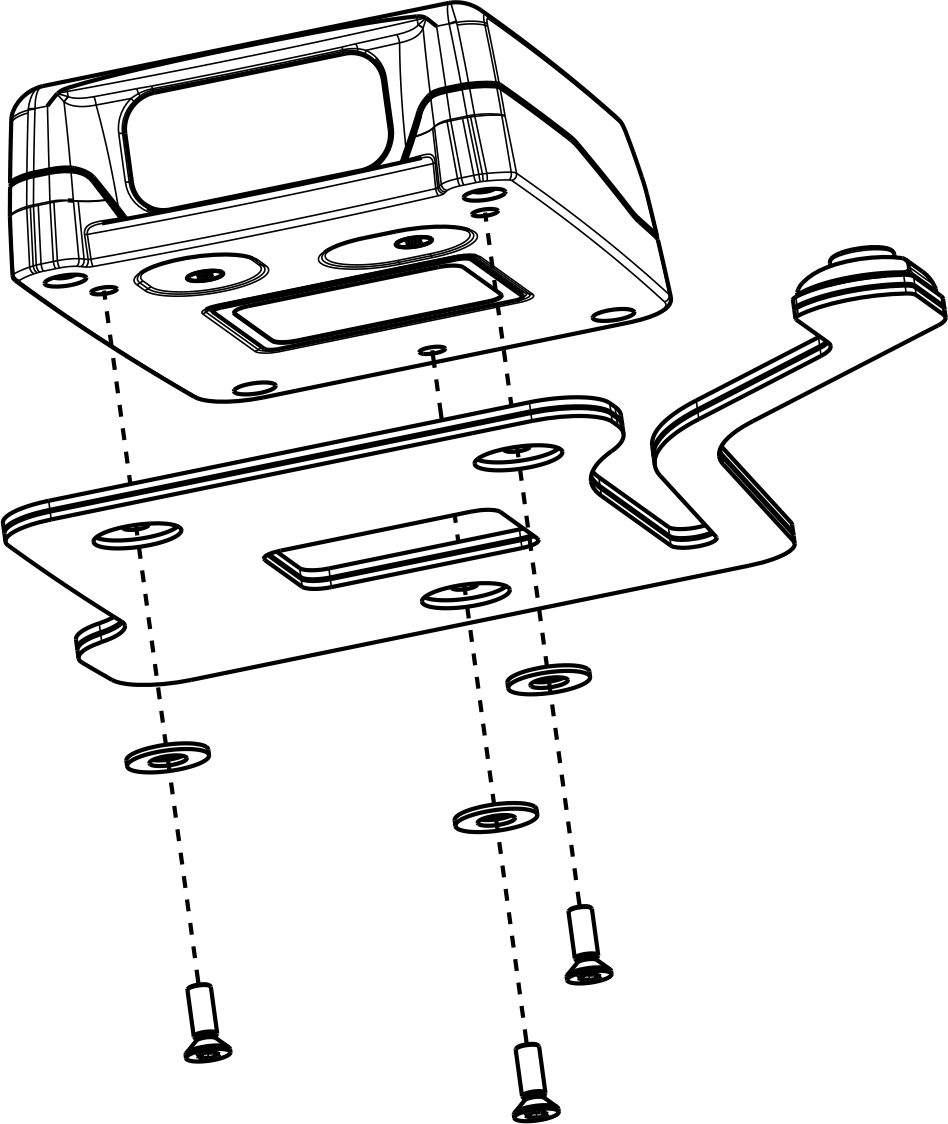
To use the Smart Watch HS 50 on the other hand or with the CLIP PAD, SMART PAD or Motion Loop, perform the following steps:
- Undo the screw connection of the Pad on the Smart Watch HS 50 using a TORX T6 driver.
- Remove the Pad.
- Place the washer in the round opening in the hook band.
- Screw the new Pad onto the Smart Watch HS 50. The specified tightening torque is 0.30 Nm.
|
|
Missing washers may impair operation!
Check that washers are fitted between the screw and the Pad. If they are missing, undo the screw connection and insert them. |