Maintenance and Cleaning
The devices of the Smart Watch HS 50 series can be operated maintenance-free.
Cleaning the touchscreen
To clean the touchscreen, use a soft, damp cloth, plus some soap or window cleaner.
 |
Do not use cleaning agents containing acids, sulfur or ammonia for cleaning. Do not use agents or cloths with abrasive or scratching properties. Do not use aggressive industrial cleaners. The product may not be cleaned with compressed air or a high-pressure cleaner. |
Cleaning of the scanner glass
What to use:
- Synthetic microfiber wipes without any added chemicals
- IPA/H2O mixture as described below
IPA (Isopropanol) and distilled water mixtures in ratios between 30/70% and70/30%. - Clean and dry hands – we recommend using powder-free and disposable silicone rubber or PUR gloves
How to use:
- Moisturize the wipe lightly (spray once or twice only)
- Clean the surface by wiping from the centertowards the edges (wet wiping)
- Use a dry wipe for final polishingimmediately after wet wiping
- Apply circular motions from the center and outwards. This should remove remaining stripes or stains completely
- Repeat wet wiping and dry polish if the cleaning hasfailed to remove contaminants
Please note:
- Do not wash (recycle) wipes using softeners or detergents
- Do not polish the surface using abrasive materials (glass/ceramiccleaner)
- Do not use regular ‘kitchen wipes’, as they might produce scratches
- Non-woven polishing wipes similar to Katrin 45591 (www.katrin.com) or ABSORMATTM (www.crtoy.com), is also recommended
- Do NOT apply any substances that claim to improvesurface quality i.e., silicon sprays and ‘lotus effect sprays’
Cleaning the Smart Watch HS 50
The electrical components of the Smart Watch HS 50 are protected against the ingress of dust and water with protection class IP 65. For cleaning, it is best to use window cleaning agent and a soft cloth.
Replace internal battery
The internal battery loses power over time. If the capacity is no longer sufficient for smooth operation, the battery must be replaced by NIMMSTA. Use our NIMMSTA Customer Service for this, which can be requested via the B2B portal.
TRIGGER PAD change - operation for left-handed use or CLIP PAD
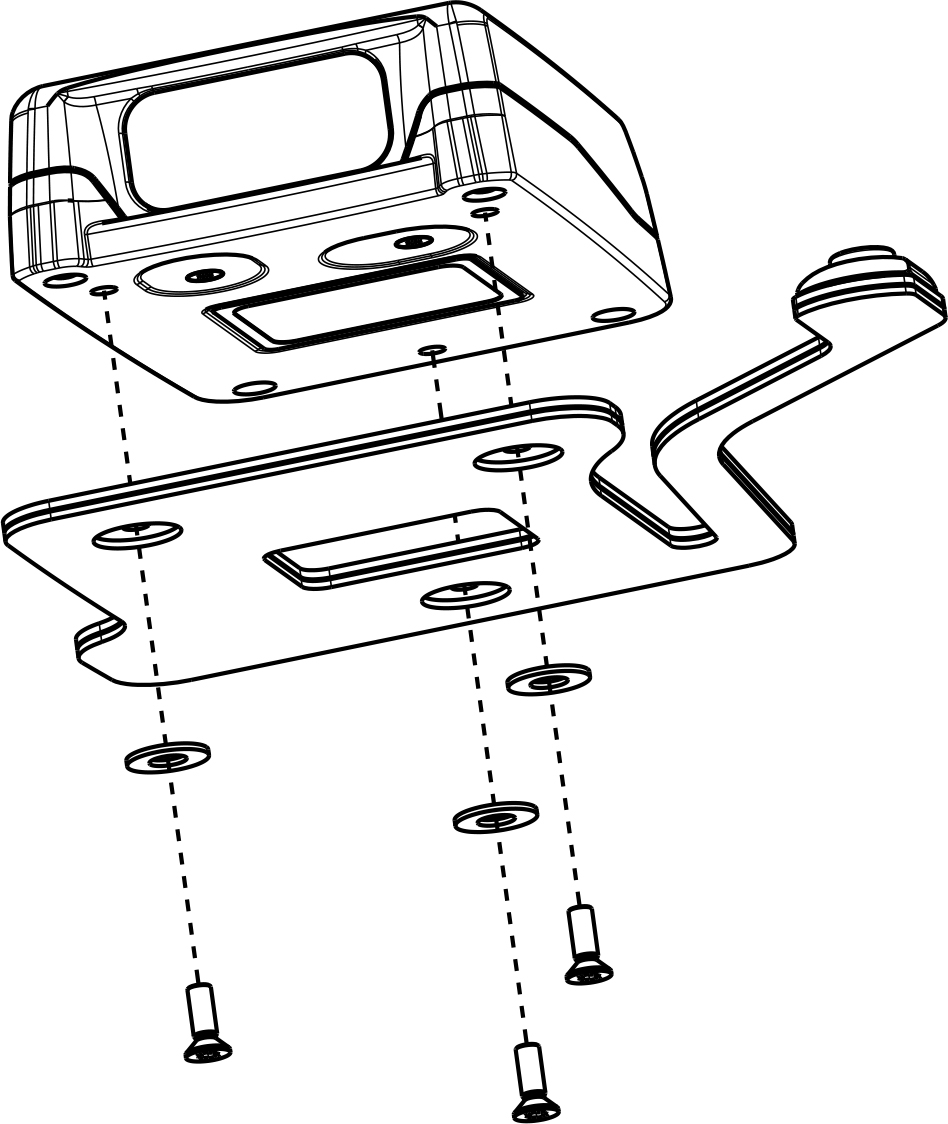
To use the Smart Watch HS 50 on the other hand or with the CLIP PAD, the following steps must be performed:
- Loosen the screw connection of the pad on the Smart Watch HS 50 with a TORX T6 pin wrench.
- Remove the pad.
- Place the shims in the round opening in the hook band.
- Screw the new pad to the Smart Watch HS 50 The prescribed tightening torque is 0.30 Nm.
|
Functional impairment due to washers not being inserted! Check whether the washers are inserted between the screw and the pad. If they are missing, open the screw connection and insert some. |